- 01
Watch the signals all day
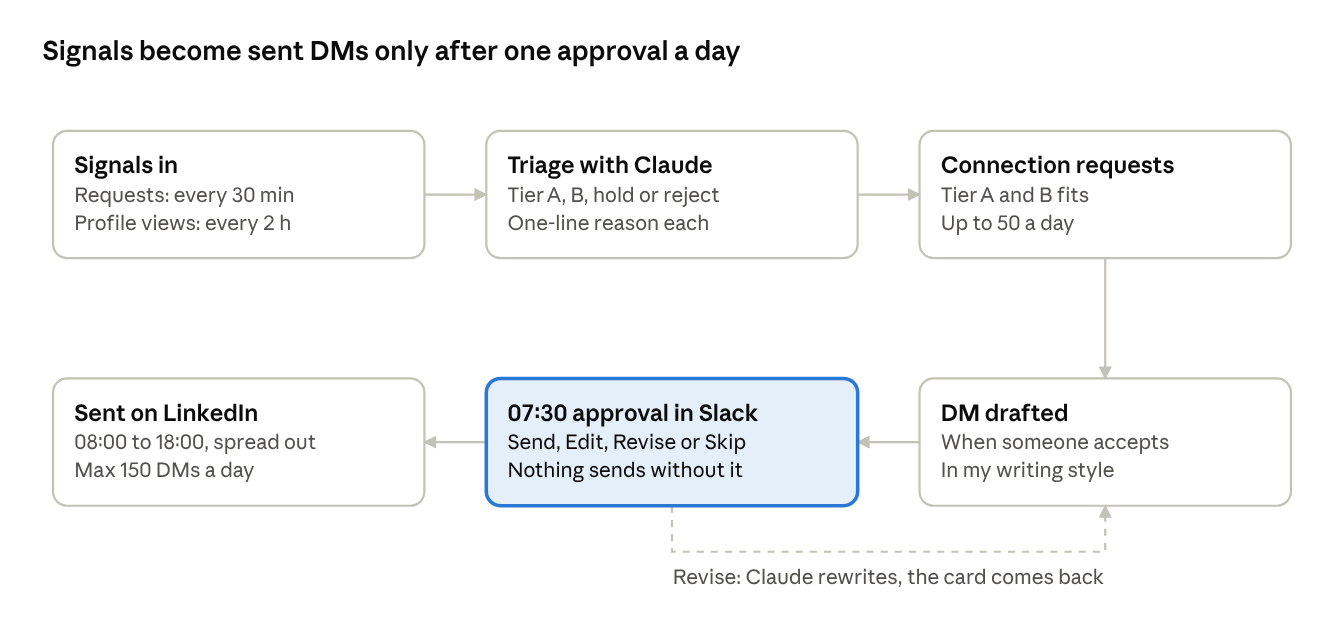
- Check incoming connection requests every 30 minutes
- Check profile viewers every 2 hours
- Turn good-fit signals into connection requests, up to 50 a day
- Draft a DM the moment someone accepts
- 02
Write your triage rubric first
- Tier A, buyer: founders, CEOs, CROs, heads of sales, revenue, growth or RevOps at B2B software companies (roughly 10 to 1,500 people) in your regions. Accept, connect, DM
- Tier B, network: GTM engineers, Clay builders, peer founders, VCs and angels, event organisers, podcasters. Accept, lighter DM
- Hold: individual contributors at good-fit companies, vague headlines, unclear region. A human decides
- Reject: vendors pitching you, recruiters, job seekers, B2C, students, empty or fake profiles
- A wrong reject costs more than a wrong accept: when torn between B and reject, pick hold
- The note decides: a connection note that pitches a service is a reject, a genuine note is at least a hold
- Keep the rubric as a plain-text prompt so you can edit it like a document
- 03
Set the DM rules
- Claude drafts in your voice, from the writing style guide Crispy builds from your own messages
- Open with "Hi {FirstName}," on its own line. No sign-off, no emoji
- 3 to 5 short lines, with one personal line about their company, role or the signal
- Mention the trigger naturally: the event, the profile view, their post
- One soft ask: a quick call, a coffee, or simply a question. No pitch, no case studies, no numbers
- Adjust by segment: ask VCs about their portfolio, give service providers a referral angle, give speakers a line about their talk
- Check the conversation first, so you never send a cold opener into a warm thread
- 04
Clear one approval batch at 07:30
- One batch lands in a Slack channel every weekday: incoming requests with a recommendation, today's outgoing requests, and every DM draft as its own card
- Each card has four buttons: Send, Edit, Revise (type feedback, Claude rewrites) or Skip
- Or reply in the thread: "ok" approves, "send: <text>" sends that exact text, anything else is feedback
- Approved messages go out between 08:00 and 18:00, spread over the day
- 05
Build the guardrails in
- Nothing sends without approval, and only one person can approve
- Approval locks a fingerprint of the exact text: if the text or approver changes, it refuses to send
- Each message is claimed before sending, so a retry can't send it twice
- Daily caps: 150 DMs and 50 connection requests, never more than the account has left
- One open DM per person, and a master switch that runs everything without sending
- Keep every draft and edit, so you can learn better templates from your changes
- 06
Start with version 1 in an afternoon
- Connect Crispy to Claude Code: it gives the agent your inbox, connections, profile viewers and sending. Sign up through the Crispy link below for $25 off your first payment
- Put your triage rubric in the prompt
- Tell it to check new connections and profile viewers, classify them, draft a DM for each new tier A or B connection, and show you every draft before sending
- Keep state in a JSON file (seen, invited, drafted, messaged) so it never repeats itself
- Run it on a loop, approve in the terminal, and tune the rubric and DM rules every day for a week
- 07
Move to version 2 once it's proven
- Crispy for LinkedIn data and sending, the Claude API for triage and drafting
- Inngest for schedules and background jobs, Neon Postgres for people, invites, drafts and versions
- A Slack app with buttons for approvals, hosted on Railway
- The prompts barely change: the jump is about reliability, phone approvals and guardrails enforced in code
- 08
What comes next
- More signals: hiring and funding posts, and people engaging with posts in your space
- Reply handling: drafted replies, and anyone asking for a meeting surfaced right away
- Learning from edits: a daily stats summary and templates that improve from your changes
Tools mentioned
- Crispy
- Claude Code
- Claude API
- Slack
- Inngest
- Neon Postgres
- Railway
Linked tools are referral links.